# Borrow

&#x20;**How to use the Borrow and Repay feature**

*To borrow from the Assets module*

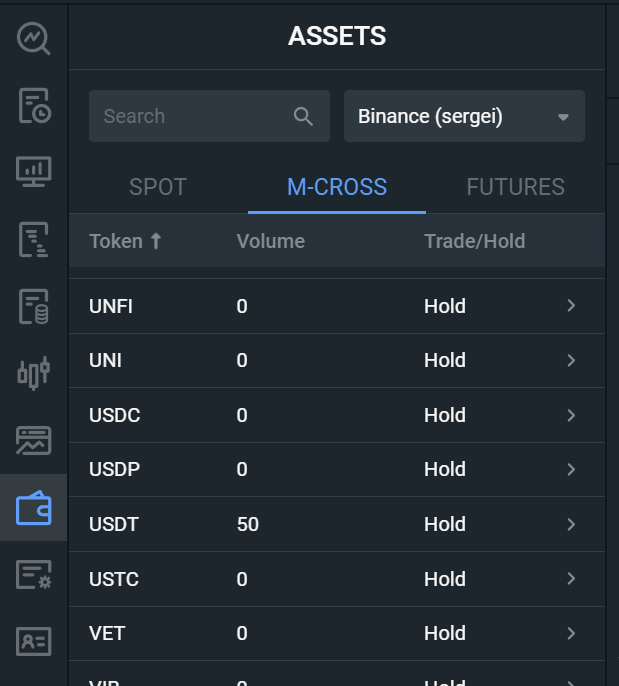
Open the Assets module, go to M-Cross

<figure><img src="https://591419216-files.gitbook.io/~/files/v0/b/gitbook-x-prod.appspot.com/o/spaces%2FVaZsqm5yzVCnvvcwFBZY%2Fuploads%2FuUqI9lMkCZBleRJ4d7fL%2Fimage.png?alt=media&#x26;token=189fad19-49a9-4174-a15e-103790d44d90" alt="" width="310"><figcaption></figcaption></figure>

Select the cryptocurrency you want to borrow

The Borrow and Repay form will appear in a new window

<figure><img src="https://591419216-files.gitbook.io/~/files/v0/b/gitbook-x-prod.appspot.com/o/spaces%2FVaZsqm5yzVCnvvcwFBZY%2Fuploads%2FgJ1E8v6BxwSnUirWgkHt%2Fimage.png?alt=media&#x26;token=b6f92e24-10f9-4c01-bf35-31a302a6c994" alt="" width="281"><figcaption></figcaption></figure>

&#x20;*To borrow from the Trading module*

In the Trading module in the MARGIN trading scheme

<figure><img src="https://591419216-files.gitbook.io/~/files/v0/b/gitbook-x-prod.appspot.com/o/spaces%2FVaZsqm5yzVCnvvcwFBZY%2Fuploads%2F7uktNLXXlu65OUETV8QY%2Fimage.png?alt=media&#x26;token=f6567c3e-a0d3-40de-9882-c6c150ce3e5f" alt="" width="308"><figcaption></figcaption></figure>

Click on the icon ![](https://591419216-files.gitbook.io/~/files/v0/b/gitbook-x-prod.appspot.com/o/spaces%2FVaZsqm5yzVCnvvcwFBZY%2Fuploads%2FUZ1u1of8Hzcy3mlPKyF9%2Fimage.png?alt=media\&token=1eeccab0-1011-4a3c-9c75-48f6f5e5e6db)

The Borrow and Repay form will open.

<figure><img src="https://591419216-files.gitbook.io/~/files/v0/b/gitbook-x-prod.appspot.com/o/spaces%2FVaZsqm5yzVCnvvcwFBZY%2Fuploads%2Fof2FKxUlBC7z3hcZxREC%2Fimage.png?alt=media&#x26;token=5488e25c-0545-4506-b64c-f9ab5b643355" alt="" width="304"><figcaption></figcaption></figure>